NB! This is not a new app version, you don't need to update if you are already on 1.1.1.
If not, you can update now - Either scan or click on the buttons:
Shift leader
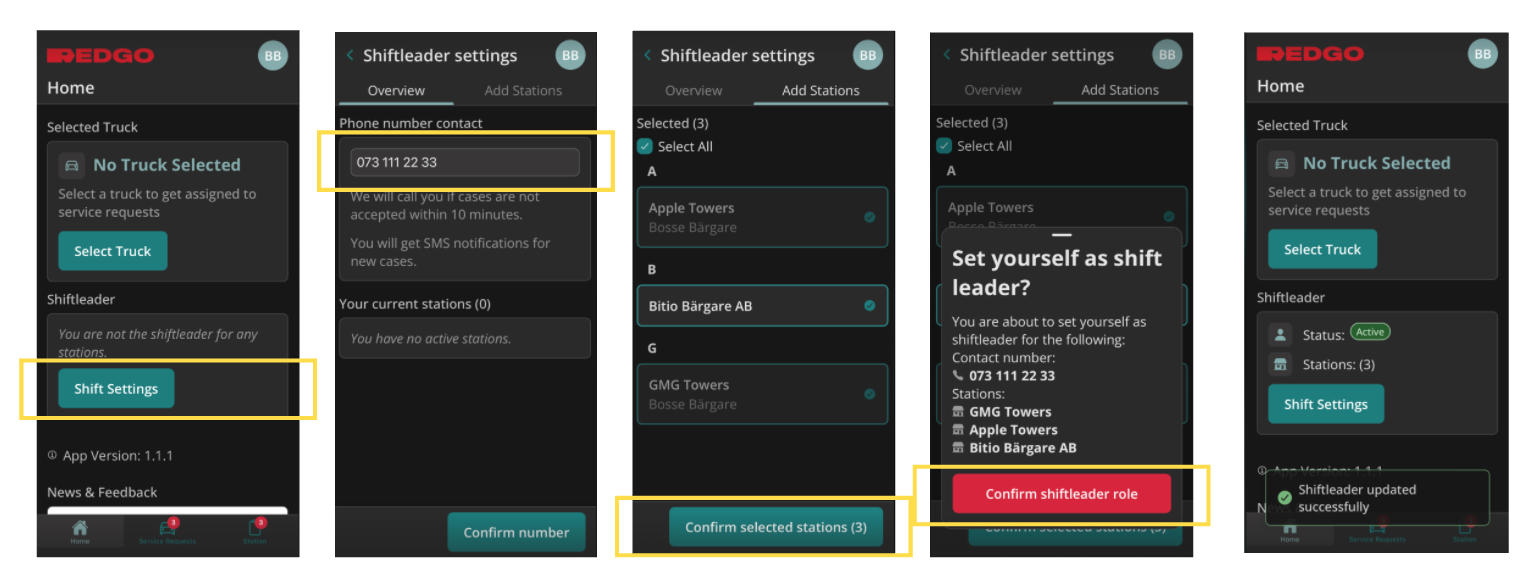
How to set yourself as shift leader:
- Click on Shift Settings from Home page.
- Set phone number. This will be remembered next time you are shift leader, but you can change it then if you want.
- Choose stations you are shift leader for. This will be remembered next time you are shift leader, but you can change it then if you want. Here you can also see who is shift leader right now.
- Confirm.
- See that you are active shiftleader and how many stations on Home page.
What does it mean to be shift leader?
- Each station needs to have one shift leader. You can't unset yourself, but other towers and dispatchers can remove you as shift leader when they take over.
- You will get a sms about all new cases to the station.
- Go into Connect (station tab) to accept and assign.
Accept and assign functionality has been there since summer. And it is available for all towers, not only the shift leader. - NB! One change from RSA is that all new cases/SR are dispatches to the station, not the shift leader. The shift leader will get sms, but will not see it in her queue. Then multiple towers can help picking cases.
Reassign
- Right now you can reassign before the tower has accepted, but not after. We are working on making it possible.
- If you need to reassign now, you will need to use RSA.